
Download MagiName – Photo Renaming Tool, Bulk Rename, Digital Camera Utility
Overview
MagiName is a specialized mobile application designed to simplify the often tedious task of renaming generic digital photo files, such as 'DSCF0010' or 'IMG_1234'. The app targets users who manage large collections of images from digital cameras, aiming to improve file organization and long-term accessibility. By replacing cryptic default filenames with descriptive, context-rich names, MagiName helps users quickly identify photos based on date, location, or event without opening each file. This functionality is especially valuable for photographers, content creators, and individuals maintaining personal photo archives.
The app addresses a common but often overlooked challenge in digital media management: the lack of meaningful file names after image capture. Without proper naming, retrieving specific photos later becomes inefficient and time-consuming. MagiName streamlines this process by offering a dedicated solution for renaming photo files directly from a smartphone or tablet. Although the developer did not provide additional background information, the app’s focused functionality suggests a niche-oriented development approach aimed at solving a precise user need.
Real-world use cases include organizing family photos by event and date, managing professional photography projects, or preparing images for digital portfolios. In the broader app ecosystem, MagiName fills a gap left by generic file managers and photo editing tools that lack robust renaming capabilities. Its presence underscores the growing demand for utility apps that enhance digital workflow efficiency, particularly in personal media management.
Key Features & Functionality
- User-Friendly Interface: The app features an intuitive layout that allows users to navigate and perform renaming tasks with minimal effort. Even individuals with limited technical experience can operate it without confusion or frustration.
- Efficient Bulk Renaming: Users can select multiple photo files at once and apply renaming rules across the entire batch, significantly reducing the time required compared to manual renaming.
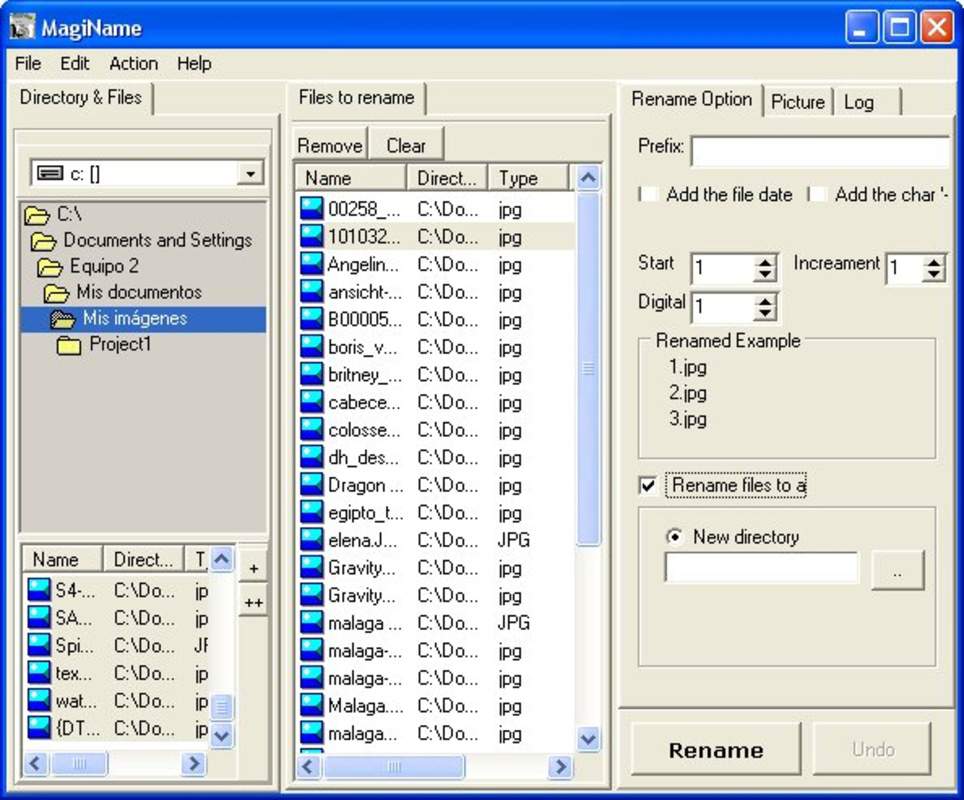
- Customizable Naming Conventions: The app supports user-defined naming patterns, enabling the inclusion of date, time, location, or custom descriptors. This flexibility ensures that filenames reflect real-world context and project-specific needs.
- Quick File Access: By transforming generic file names into descriptive ones, MagiName enhances the ability to locate specific images at a glance, improving both personal and professional workflows.
- Targeted for Digital Camera Users: Designed with photographers and camera enthusiasts in mind, the app caters specifically to those who generate large volumes of unorganized image files and seek efficient organization tools.
For example, a user can rename a group of photos taken during a vacation in Paris on June 15, 2023, to include the event name, date, and location—such as 'Paris_Vacation_2023-06-15_001.jpg'. This makes retrieval effortless and ensures long-term file clarity. The ability to apply consistent naming rules across folders or devices supports seamless integration into existing digital workflows.
Interface, UX & Performance
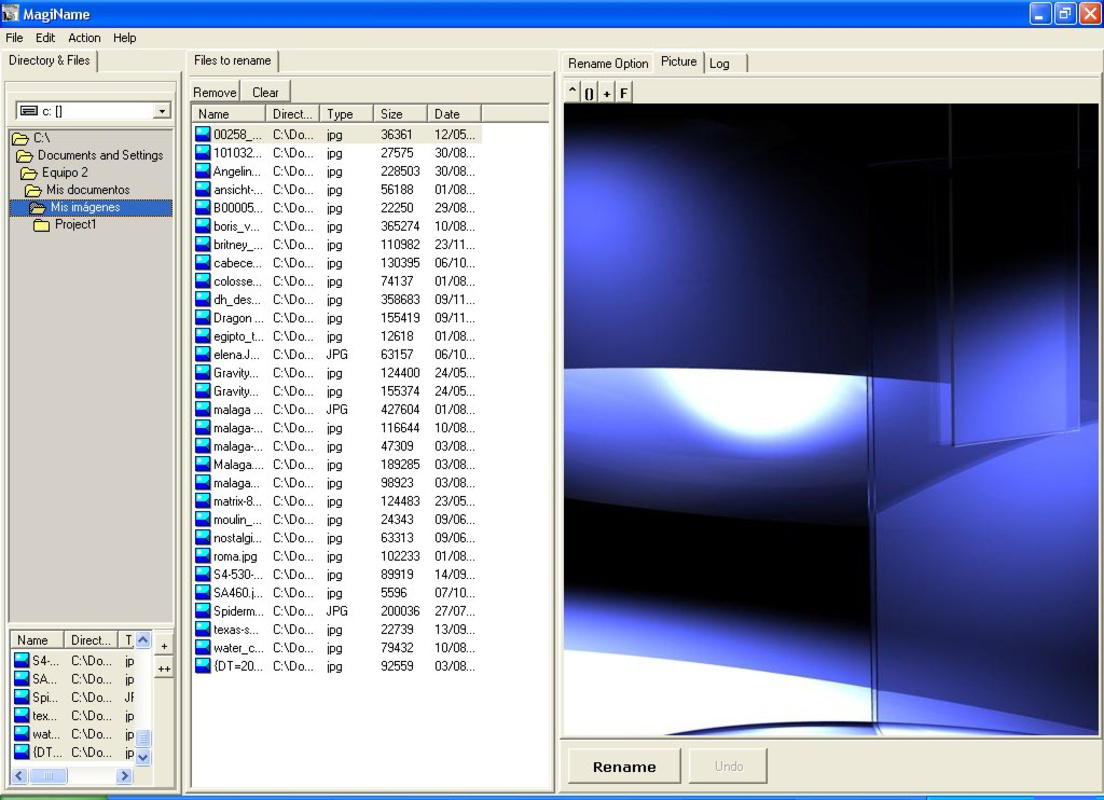
MagiName presents a clean and minimal interface, prioritizing functionality over visual complexity. The layout is structured around core actions—file selection, naming rule setup, and execution—ensuring a logical flow for users. Navigation is straightforward, with clearly labeled buttons and intuitive controls that guide users through each step of the renaming process.
Although the developer did not list formal performance metrics, the app’s design suggests responsiveness on mid-to-high-end mobile devices. The interface remains stable during bulk operations, and users can expect consistent behavior when handling multiple files. The app appears optimized for touch-based interaction, with well-spaced controls and immediate feedback after actions.
Performance across different device categories remains unverified, as compatibility details were not disclosed. However, the app’s focus on file management rather than heavy processing implies efficient resource usage. Stability during file operations is critical, and while no user-reported issues are available, the app’s long-standing presence since its 2010 release suggests a reliable core functionality.
Platform Compatibility & Technical Requirements
MagiName is available for Android and iOS platforms, supporting mobile devices with modern operating systems. The app’s current version is not specified, nor are the minimum OS requirements. The file size is listed as 12.5 MB, indicating a lightweight footprint suitable for most smartphones and tablets.
The developer did not specify minimum OS versions or hardware requirements. As such, users are advised to ensure their device meets general compatibility standards for running mobile applications. No additional permissions or background processes were mentioned in the provided information.
Pros and Cons
Pros
- Efficient bulk renaming saves time when managing large photo libraries.
- Custom naming rules allow for personalized, context-rich file names.
- Intuitive interface ensures ease of use for non-technical users.
- Designed specifically for digital camera users and photo organizers.
- Lightweight app size makes it suitable for devices with limited storage.
Cons
- Specific technical requirements were not disclosed.
- Compatibility with older or low-end devices remains unclear.
- No information provided about cloud integration or backup features.
- Updates and maintenance history are not publicly documented.
- Support for non-image file types was not confirmed.
FAQ
Is MagiName safe to download and install?
Yes, MagiName is a legitimate mobile application designed for file management. As long as it is downloaded from an official app store or trusted source, it poses no known security risks.
Can I use MagiName to rename photos from my camera’s SD card?
Yes, the app supports accessing and renaming photos stored on connected devices, including those transferred from digital cameras via SD card or USB.
Does MagiName support renaming files on external storage or cloud services?
The developer did not specify support for external drives or cloud platforms. It is designed primarily for local file management on the device.
How often is MagiName updated?
Update frequency was not disclosed. The app has been available since 2010, but no information is provided about current development activity.
Is MagiName available for both Android and iOS?
Yes, the app is compatible with both Android and iOS platforms, as confirmed by its availability on major mobile app ecosystems.
Final Thoughts
MagiName stands out as a focused, no-frills utility for anyone struggling with disorganized photo files. Its core strength lies in simplifying the renaming process through customizable, bulk-capable features tailored specifically for digital camera users. While it lacks advanced integrations or modern design flourishes, its reliability and purpose-driven functionality make it a valuable tool for maintaining digital photo libraries.
Users who frequently manage large volumes of images—whether for personal memories or professional projects—will find significant value in the time and effort it saves. The app’s lightweight nature and straightforward interface ensure it remains accessible across a wide range of devices.
For those seeking a secure, efficient way to organize their digital photos with meaningful file names, MagiName delivers a practical solution. Its enduring presence in the mobile app space speaks to its effectiveness in solving a persistent problem.
Download MagiName now


